You have a complete Spain visa file, and the last step is to submit on the portal and sign, but there’s no e-signature? We’ll file for €80 per applicant.
We have the e-signature. Under a power of attorney, like any intermediary. Filing only, so it’s a fraction of €599+.
Filing documents with UGE
Filing, step by step
Create an account, choose how the government fee is paid and pay for the service. Then upload each applicant’s ready PDFs in their own area and sign the power of attorney.
1
2
3
4
5
6
7
8
9
Price
€80per applicant
Any applicable VAT or similar tax is included.
Spain’s government fee 790-038 is separate: approx. €74 per applicant, paid to the Spanish government. We can pay it for you at no markup. It then appears as its own line in the same payment.
Example: 1 applicant with the fee paid by us comes to approx. €154.
One payment in euros through Stripe, before uploading the documents and filing.
If you cancel before any application in your order is filed, we refund the full service fee.
Why €80?
We don’t review documents or advise on visas. You prepare the package yourself, by design. You pay for:
signing and filing your ready package with our electronic certificate, usually within 12 hours once everything is ready
the official UGE filing receipt (justificante) in your account
forwarding UGE notifications to you by email
Who files
A representative acting under your power of attorney files your application with their own electronic certificate. You sign the application form and the power of attorney yourself. The provider’s legal details: Legal Notice
Who this service is for
Use this if
Your documents are already ready
You only need a digital signature and online submission through the Spanish portal
What is not included
Document preparation
Review of your document package
Legal or immigration advice
Translations, apostilles, and government fees unless added separately
Appeals, TIE appointments, and approval guarantees
How the submission works
01
Create an account, choose how the government fee is paid and pay for the service. Then upload each applicant’s ready PDFs in their own area and sign the power of attorney.
02
Sign the power of attorney. If we pay the government fees for you, enter the payment references in your documents and upload the updated PDFs.
03
We submit your documents to UGE. Your filing receipt and updates appear in your account, with notifications by email.
FAQ
How much does it cost?
€80 per applicant for filing, VAT included. Each family member is a separate applicant. Spain’s government fee 790-038 is separate: approx. €74 per applicant. We can pay it for you at no markup, as its own line in the same payment. Example: 1 applicant with the fee paid by us comes to approx. €154.
When do I pay?
Create an account, choose how the government fee is paid and pay for the service. Then upload each applicant’s ready PDFs in their own area and sign the power of attorney.
Can I get a refund?
If you cancel before any application in your order is filed, we refund the full service fee and any money for the government fee that we have not yet paid. We are responsible for the technical filing and the proof of submission, not for the decision on your application. Your statutory consumer rights remain available.
Why only €80?
Because we don’t review documents or advise on visas: you prepare the package yourself. You pay for signing and filing it with our electronic certificate, usually within 12 hours once everything is ready, for the official filing receipt and for forwarding UGE notifications to you.
Who files my application?
A representative acting under your power of attorney, who signs with their own electronic certificate. The provider’s identity and contact details are published here: Legal Notice
What does “digital certificate” mean?
A digital certificate (certificado digital) is the electronic ID that Spain’s government portals require to sign and submit an application online. You don’t need your own: we sign and submit with ours as your representative. You sign the application form yourself.
How can you file for me?
Only as your technical representative under a limited written authorization for this filing: upload the package, submit it to UGE, and receive the filing confirmation and related notices. We cannot change your documents or make legal decisions.
What happens to my documents?
You upload through the private portal, then we submit to UGE. We keep working copies in private storage until a final decision, then delete them. You can ask us to delete them right after a successful filing. Deleting our copies does not delete them from the government system.
Do I get the UGE receipt and expediente number right away?
The official UGE filing receipt (justificante: date, time, registration number) is in the private portal as soon as we file. The expediente number may appear later; we forward it when it shows up in the system.
Can I send documents for the whole family before the main applicant has a UGE registration number?
Yes. Upload the prepared documents for the whole family together. We first file the main applicant’s application, obtain the UGE registration number and use it when filing the family members’ applications. You do not need to wait for the number before sending us the family’s documents.
Does each family member need a separate account?
No. One account is enough for a family filing. Enter the total number of applicants. After payment, upload each person’s documents into their own area. Each applicant has their own filing receipt, UGE registration number and status.
How do I upload PDF documents for a family, and what is the size limit?
Upload PDFs into each applicant’s own area after payment. UGE accepts at most 24 MB of documents per person in total, including later additions. Your account shows the total for each applicant and rejects files that would exceed it.
How often will I receive status updates?
UGE notices about status changes appear in your account and are forwarded by email. We also check the application status every Tuesday and Friday and email you after each check with the status of every applicant and a screenshot from the UGE portal.
See a sample email
Subject: UGE status: In progress at UGE (En trámite) · Spain Visa Submit #1234
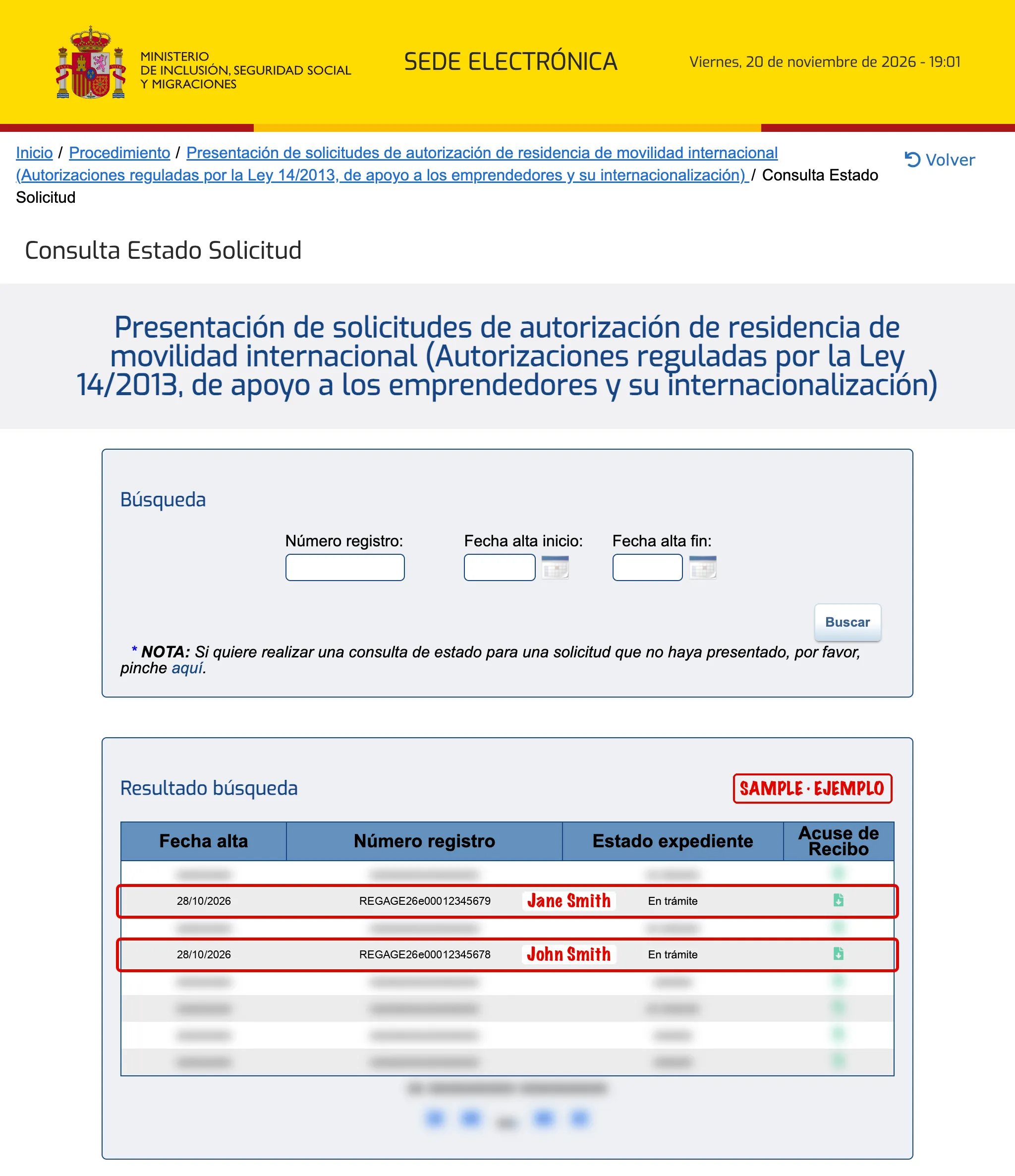
This is the email you get after each check, in the language of your application. The screenshot shows the UGE portal list. Your applications are framed in red and labelled with names. Other people’s applications are hidden. Open the screenshot full size
The names, numbers and dates in this sample are fictional.
What happens if UGE requests additional documents?
We send the request information to you by email. Uploading ready additional files supplied by you is included in the original service price; drafting a response or legal analysis is not included.
What if the status changes between routine checks?
When a status change is recorded, we send a separate email without waiting for the next routine update.
Are several applicants tracked separately?
When UGE assigns separate registration or expediente numbers, we track and report the status for each applicant separately.
What will I receive after filing?
We send the UGE registration number and the official PDF submission receipt confirming that the application was accepted by the portal.
How will we communicate?
All communication after this form, including payment, document transfer and status updates, continues by email.
What if the form does not work or I have a question?